Personality
Every Spark can sound the way you like. Pick one of eight voices and add a few words of your own. Your choice is yours alone: the same Spark can be calm with you and witty with a friend.
A personality changes how a Spark talks, never what it can do. Its skills, what is true, and its safety rules stay exactly the same.
Where to find it
Open a Spark's profile (tap its name at the top of the chat), then Personality under appearance. The row shows your current choice.
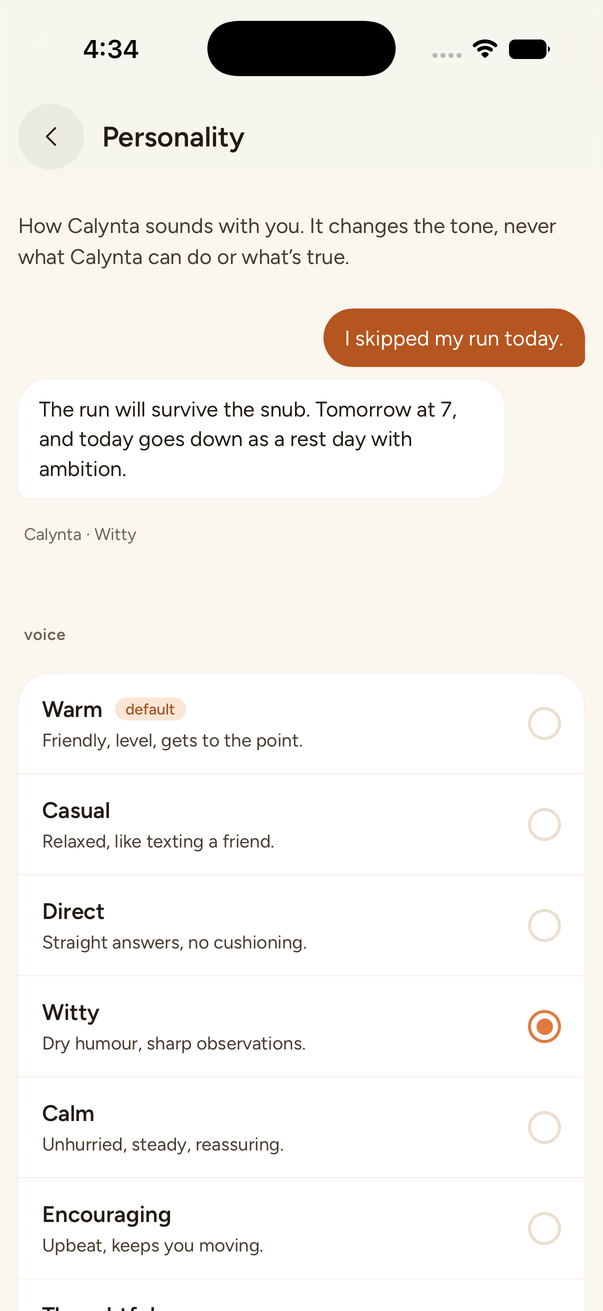
The eight voices
| Voice | In a few words |
|---|---|
| Warm (the default) | Friendly, level, gets to the point. |
| Casual | Relaxed, like texting a friend. |
| Direct | Straight answers, no cushioning. |
| Witty | Dry humour, sharp observations. |
| Calm | Unhurried, steady, reassuring. |
| Encouraging | Upbeat, keeps you moving. |
| Thoughtful | Curious, explores the why. |
| Crisp | Professional and efficient. |
At the top of the screen the same message, "I skipped my run today.", is answered in the voice you pick, so you can hear the difference before you chat. Tapping a voice saves it straight away.
In your own words
Under the voices there is a short note, up to 1,500 characters, for anything the presets do not cover: what to call you, how long replies should be, spelling, emoji. For example: "Call me Sam, keep mornings short, British spelling, no emoji."
The note is about how the Spark talks to you. A note that tries to give the Spark new instructions, rather than describe a way of talking, is not saved, and the screen says why.
Where it applies
- Chat: every reply from that Spark.
- Calls: the Spark speaks in the same voice.
- Longer work: reports and research it does for you keep the voice too.
- Groups: each person's assistant keeps the voice its owner chose. Your choice never changes how someone else's Spark sounds.
Good to know
- Every Spark starts on Warm until you choose.
- Changing the voice never changes the Spark's job, its memory, or the apps it can use.