Specialists
Specialists are ready-made Sparks for a particular job. Add one and it joins your team: you can chat with it any time, and Calynta can hand it a question when it fits its field.
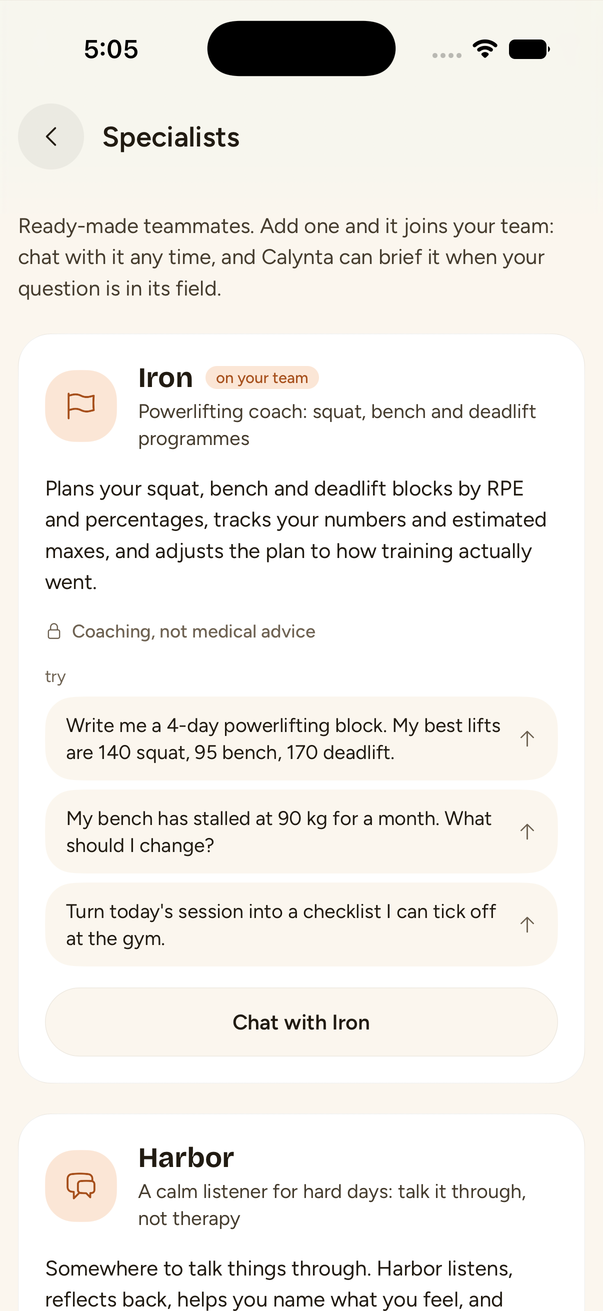
The six specialists
| Specialist | What it does | The limit it keeps |
|---|---|---|
| Iron | Powerlifting coach: squat, bench and deadlift programmes by RPE and percentages, estimated maxes, session checklists. | Coaching, not medical advice. It asks a few health questions first and stops you if something hurts. |
| Harbor | A calm listener for hard days: reflects back, helps you name feelings, grounding and journaling exercises. | Not therapy and not for emergencies. It says it is an AI, and if you might be in danger it gives crisis contacts and stays with you. |
| Lingo | Language partner: conversation practice at your level, in chat or on a call, with a vocabulary list. | Corrections come after a few turns, so the conversation flows. |
| Compass | Career coach: mock interviews, CV and cover letter drafts, a job-hunt plan. | Reads the real job post first and never invents experience. Salary figures are estimates. |
| Ledger | Money coach: budgets, debt payoff plans, subscription audits. | Not a licensed adviser, no investment picks, and it never moves money. |
| Atlas | Trip planner: day-by-day itineraries from real opening hours, travel times and prices. | Marks any price it could not check, and never books or pays without you. |
Adding one
- Yourself: open Pulse, then the Add a specialist tile under your team, or open Calynta's profile and tap Add a specialist. Tap Add on a card. Tapping one of its "try" lines adds it and opens its chat with that line ready to send.
- Through Calynta: ask for help with something a specialist covers, for example "I want to get better at Spanish before my trip". Calynta suggests the right one with a card. Nothing is added until you tap Add.
Adding the same specialist twice does nothing new: you get the one you already have.
Making it yours
A specialist starts in a voice that suits it (Iron is Encouraging, Harbor is Calm, Ledger is Crisp). You can change that on its Personality screen. The voice changes; its job and its limits do not.
Good to know
- A specialist is yours alone. Nobody else sees it.
- You can switch off Calynta's access to any teammate on Calynta's profile, under your team.
- Specialists use the same cards as every Spark: checklists, tables, charts, goals and routines.