Privacy and permissions
Permissions
Profile → Permissions lists everything Calynta can ask your device for, what each is used for, and where it stands. Calynta asks at the moment you need something, never at launch, and your device always has the final say.
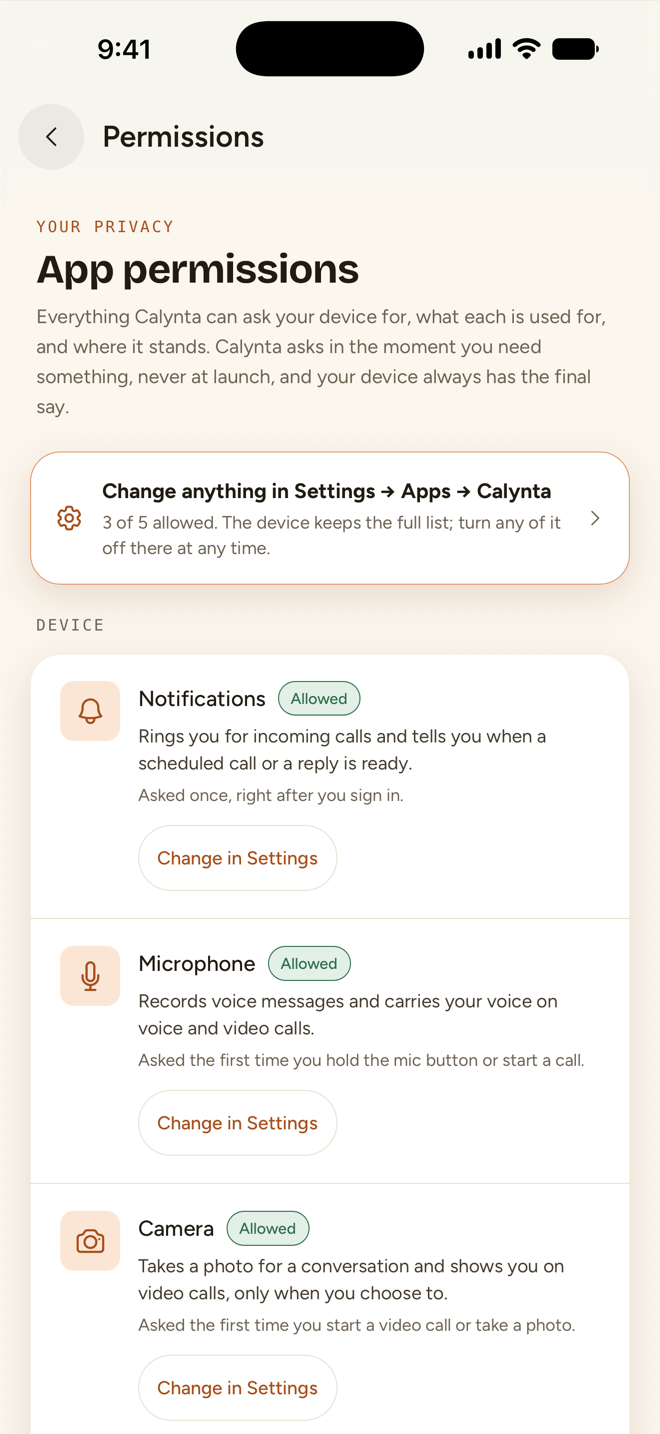
On your device
| Permission | Used for | When it is asked |
|---|---|---|
| Notifications | Ringing you for calls, and telling you when a reply or scheduled call is ready | Once, right after you sign in |
| Microphone | Voice notes, and your voice on calls | The first time you hold the mic or start a call |
| Camera | A photo for a conversation, and showing you on video calls, only when you choose | The first time you start a video call or take a photo |
| Photos | Picking photos to send (not listed on the web) | When you first need it |
| Location | Sending your location, only while the app is open | When you first need it |
In Calynta
These are granted to Calynta rather than to your device, so you change them here:
- Shared boards: whether Sparks can open a shared board on a call without asking each time.
- Fetch skills for sites and apps: on by default. See Shared browser.
Privacy
Profile → Privacy covers how your data is used, the services Calynta relies on, the privacy policy and terms of use, and how to contact support.
- Calls are not recorded.
- Delete account removes your Calynta account. It cannot be undone.
Before you delete your account
- Cancel your subscription in the App Store or Google Play first. Deleting your account does not cancel it.
- Deleting your account does not disconnect knowledge sources or clear saved browser logins by itself. Disconnect and forget them first.
- It does not guarantee that everything a Spark learned about you is erased. See Memory and the Brain.
Account security
Profile → Account lets you Add a passkey, rename it, or remove it.
Appearance
Profile → Appearance changes how Calynta looks:
- Mode: System, Light or Dark.
- Accent: twelve colour themes. Clay is the default.
- Message text size and Message corners, with a live preview.
- Chat list: two or three lines per row.
- Chat wallpaper and Material (how much glass and blur you see).