Connected apps
Connect the apps you already use, so a Spark can look things up and, with your approval, act in them.
Connecting an app
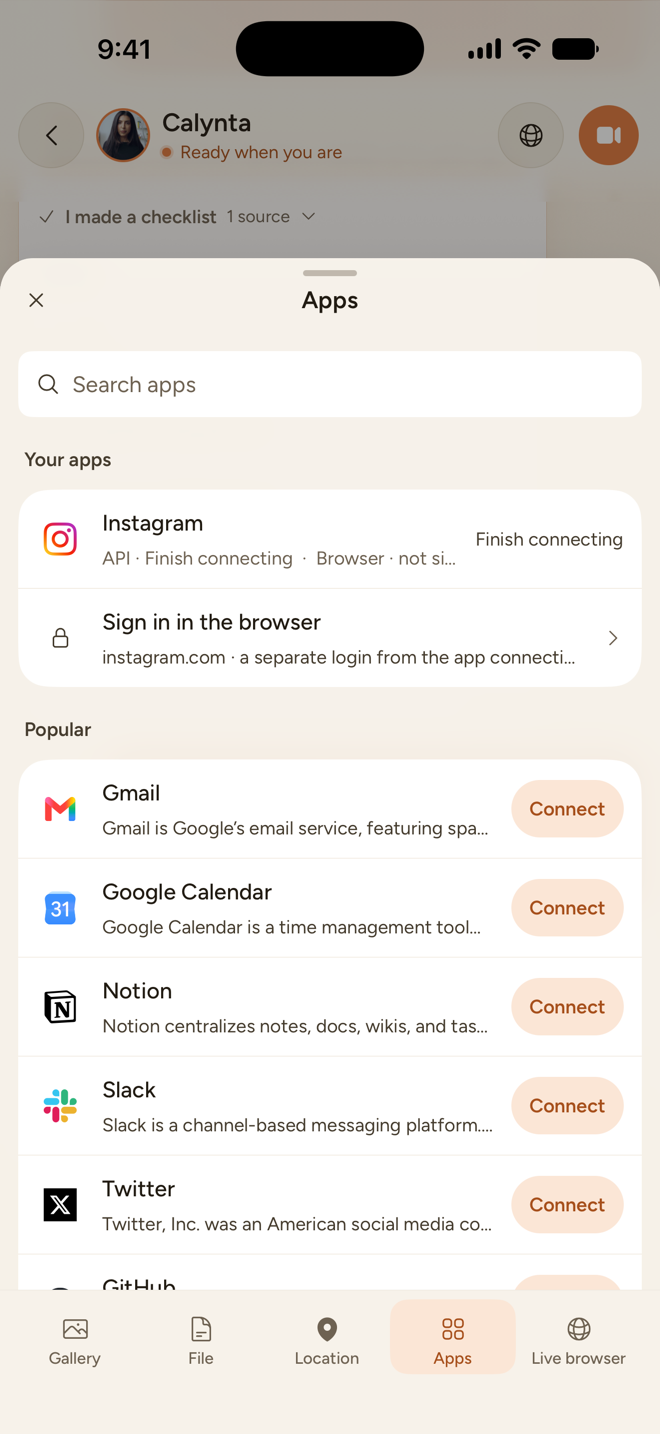
Open Profile → Connections, or the Apps tab in a chat's attach sheet.
- Your apps lists what you have connected. Turn on Use in this message for up to eight apps you want the Spark to use right now.
- Popular lists common apps, such as Gmail, Google Calendar, Instagram, Notion, Slack, LinkedIn, X, GitHub and Google Drive. More apps has the rest.
- Knowledge covers Notion, Google Drive and OneDrive as knowledge sources.
Approval before any action
Reading needs no approval. Acting does. Anything that sends, posts, books or changes something is proposed first. You approve it on a card in the chat (Approve or Not now) or in App requests.
- A proposal expires after 30 minutes.
- If Calynta is not sure an action went through, it never re-sends it by itself.
Managing connections
In Connections you can pause and resume an app, reconnect it, or disconnect it (with a confirmation). You can connect more than one account for the same app.
Connections apply to all your Sparks. There is no per-Spark setting yet.
Apps and the browser are separate
An app connection and a browser login are two different things. An app row may say "Browser · not signed in" and offer Sign in in the browser, for the times a Spark needs to use the website itself.
The full path from connecting an app to a Spark acting in it has not been verified end to end with a live account yet. Treat app actions as early: check each approval card carefully. Some apps also have their own limits: Instagram needs a Business or Creator account.